

When you’re trying to run a security firm, we know you’ve got better things to do than try to dream up the documents needed to maintain smooth and efficient operations. Documentation for your security officers to note down their daily activities, patrol reports, and, of course, the shift report all contribute to your organized system that your clients will depend on and appreciate.
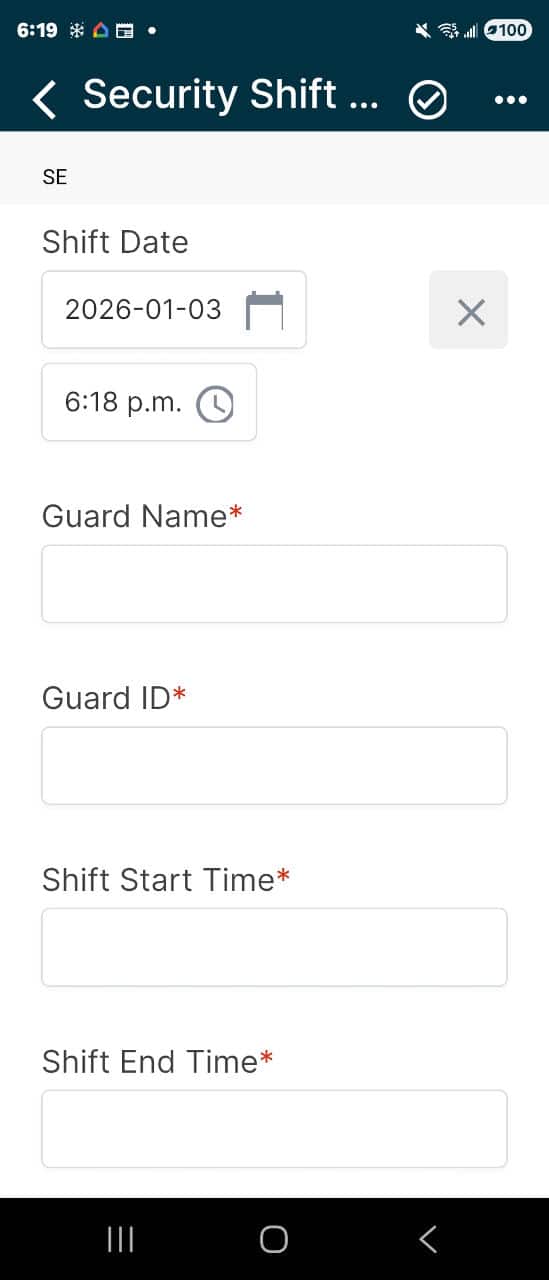
The digital security shift report incident template is a report that organizes and communicates the officer’s shift activities. A shift report provides details of activities, incidents, and observations during a specific shift, which could be a morning, afternoon, or night shift.
Following, you’ll find information about the security shift report, including a breakdown of its components and how to fill it in each section appropriately. We’ll follow up with a few tips to help you with your operations, so this is one article you’ll want to take a few minutes to read. Let’s jump into what you can expect included in the Security Shift Report template.
Key Takeaways
- Security Shift Report Basics – The security shift report organizes an officer’s daily activities and is essential for communicating incidents, observations, and patrol details to management and the subsequent shift.
- The Three Essential Sections – The template is divided into three major components to organize data effectively: Administrative Information, a Quick View of Shift Notes, and a Detailed Shift Activity Log.
- Snapshot of Incidents & Safety – The “Shift Notes” section acts as a quick snapshot, allowing officers to categorize events into security incidents, safety hazards, or general occurrences like visitor screening.
- Best Practices for Usage – A professional shift report should function like a table of contents, providing a brief, easy-to-read log that references detailed supplemental reports only when necessary.
- Advantages of Going Digital – Transitioning to a digital reporting platform increases efficiency by reducing labor costs and enabling features like photo/video uploads and instant emergency notifications.
Included In The Security Shift Report Template
Shift Report Template Basics
- Purpose: A shift report provides details of activities, incidents, and observations during a specific shift, which could be a morning, afternoon, or night shift.
- Content: Generally includes patrol activities, incident details, observations, and any issues encountered during the shift. It may also record any handover notes for the next shift, such as ongoing issues or areas needing special attention.
- Usage: Primarily for the security team and management to stay informed about what happened during a particular shift. It allows the next shift to understand ongoing situations or issues that need attention quickly.
- Frequency: Completed at the end of each shift, making it more frequent than the daily report if there are multiple shifts in a day.
The Sections Of The Security Shift Report
Our complete security shift report form is broken into three major sections. These sections are all vital for conveying and organizing the security officer’s shift activities. The areas are as follows:
- Administrative Information
- Shift Notes (Quick View)
- Detailed Shift Activity Log
Administrative Report Information
Like any report, there needs to be administrative information to help you organize your reports. It includes the officer’s name and pertinent other vital administrative information.
In order to avoid security personnel having to duplicate their identification information on each report, there is another solution, and that is to use a digital reporting solution like the 1st Reporting app. Still, we’ll get more into that later.
Shift Security, Safety, And Other Notes
The second section of the security shift report again includes three areas. These sections are as follows:
- Security Incidents Noted
- Safety Incidents Noted
- Other Shift Notes
The three columns intention is to be a ‘snap-shot’ view of the security officer’s shift. The first column is related to security incidents encountered by the security officer. The second column notes are to include safety incidents encountered. Safety is every business’s concern, and you can add value to your security firm by helping clients identify ways to prevent hazards to increase safety. To read more about safety, check out our article on Achieving Ideal Work Environments: 8 Crucial Safety Tips for the Workplace.
Lastly, the third column provides an area to note other forms of occurrences seeking inclusion on the shift report. These might include completing the employee or visitor screening forms, employee injury, or different types of incidents.
Adding things like pictures, audio, and video are ways that security personnel can deliver vital information efficiently. Unfortunately, a manually written report has difficulty finding the ability to include photos, videos, or audio. However, there’s a solution for that too with a digital platform for security reports, like the 1st Reporting app.
Detailed Shift Activity Log
The last section of the security shift report is broken further into two sections, each identical. It allows for many shift activities to be included in the shift report. Naturally, these two sections find they are broken down further into three columns: time, activity, and report number or note.

How To Use The Security Shift Report
Security officers note their activities throughout a shift. The more professional a security company and officer, the more brief and comprehensive the information relayed becomes.
As a security professional, it’s vital to convey a sense of organization to your clients. The Security Shift Report Template we have here is designed to organize the officer’s shift into an easy-to-read, ‘snap-shot’ format. Think of it like a table of contents for the shift—short-form points that deliver information without excess.
Here is how to complete the report effectively in three steps:
Step 1: Complete Administrative Information

Start every report by filling out the administrative header. This is critical for filing and retrieval later. Ensure you document the Officer’s Name, Date, Shift ID, and Site Location. In a digital app like 1st Reporting, this metadata is often captured automatically, saving time and reducing errors.
Step 2: Fill in Shift Notes (The “Snap-Shot”)

Use the “Shift Notes” section to provide a high-level overview of the shift’s events. Categorize your entries into three columns:
- Security Incidents: Any breaches, alarms, or trespass issues.
- Safety Incidents: Hazards identified or safety protocols enacted.
- General Observations: Routine items like visitor screenings or maintenance issues. Tip: Keep these brief. If a major incident occurred, note it here but reference the specific Incident Report number for the full details.
Step 3: Complete the Detailed Activity Log

The final section is your chronological record. Log specific activities broken down by Time, Activity, and Report Number.
- Be Precise: Instead of “Patrolled area,” write “Patrolled North Perimeter – Door 4 Secure.”
- Reference Supplemental Reports: If an officer completed a Vehicle Accident Report at 14:00, list that here with the cross-reference number. This gives management a quick view of the shift’s volume without cluttering the main log.
Use a Security Shift Report Template Paper Document Or Go Digital?
In the world of print, over half a million trees need to be cut and milled into paper just to produce each week’s Sunday papers in the United States. And if your business hasn’t gone digital, it can feel like that much paper is moving around your office.
What if you could take your reporting to the next level by eliminating the physical report for a digital solution? Using the 1st Reporting App, it’s not just a dream – it’s a reality. Here’s a few key takeaways of how it can benefit your company:
- Increased Reporting Efficiency with a Digital Shift Report Template
Reducing labor expenses via the use of a digital reporting platform saves a lot of money over time. Consider that every report being handwritten will take double or even triple the length of time to complete compared to a digital form. Also, the time spent cataloging, filing, and retrieving the printed forms is almost completely eliminated with a digital solution. Eliminate illegible handwriting on security shift logs by following our guide to digital reporting.
- Additional Media Coverage
Adding photos, videos or audio recordings is easy with a digital reporting solution like the 1st Reporting App.
- Instant Notifications
Setup emergency notifications based on the type of incident report being submitted. It allows you to maintain 24-hour management control over a facility, even when you aren’t there. By having one of your security officers file a report, a trigger can be set to get notifications right to your smartphone, no matter where you are.
Learn more about how 1st Reporting is the best solution for security incident mobile reporting here.
References
- “Secure Our World | CISA.” 2025. Cybersecurity and Infrastructure Security Agency CISA. 2025. https://www.cisa.gov/secure-our-world.
- “Business Organization | Definition, Types, History, Roles and Responsibilities, & Facts | Britannica Money.” 2025. Encyclopedia Britannica. 2025. https://www.britannica.com/money/business-organization.
- “Security Guards and Gambling Surveillance Officers.” 2025. Bureau of Labor Statistics. August 28, 2025. https://www.bls.gov/ooh/protective-service/security-guards.htm.


