

Completing a use of force report form (UOF or UOFR) is vital for police officers’ documentation of their more dangerous duties. The agency keeps reports to reflect how officers are using force and criminal investigations.
But some law enforcement agencies struggle with completing the use of force report form promptly, or even at all. So, how can we best serve our law enforcement officers with their complex tasks? We can make their incident reporting more manageable and more efficient to complete.
Key Takeaways
- Streamlined Digital Reporting: Moving UOF reporting to a digital mobile app allows officers to complete complex documentation efficiently from their patrol vehicles without returning to the precinct.
- Comprehensive Incident Details: The digital use of force report form prompts for all essential information, including precipitating events, force options used, injuries incurred, and subject details to ensure a complete investigation.
- Real-Time Supervisor Review: Supervisors can review, request changes, and approve reports on the spot using their own handheld devices, significantly speeding up administrative workflows.
- Multimedia Evidence Integration: Officers can utilize their mobile devices to record and instantly attach photos, videos, and audio clips directly to the report for greater accuracy.
- Data Security and Analysis: Secure cloud-based storage protects sensitive information while allowing agencies to analyze data trends and maintain accurate records for court proceedings.
Enter The Digital UOF Report Form
This new tool allows officers to collect all the information necessary to document the situations police encounter. Just download the 1st Reporting app, invite your officers, and get reporting. Yes, it’s really that easy with secure cloud-based storage.
Let’s talk about what the digital use of force report form includes and how it can best serve your law enforcement force policy documentation process.
Included In The Use Of Force Report Form Template
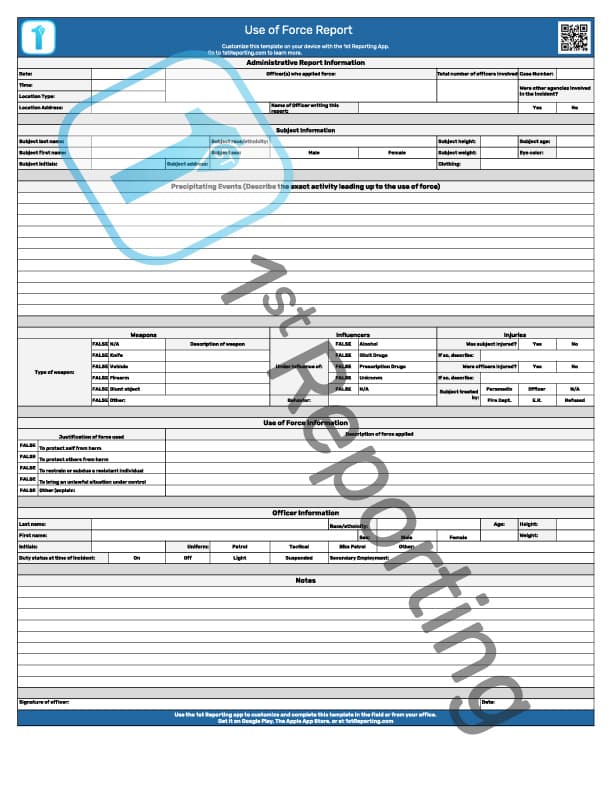
The UOF digital form includes the following:
- Administrative information – allows officers to complete a report without a supervisor dictating what should be included; headings prompt the information.
- Subject information – This will include the subject’s name as well as other information as necessary.
- Location of the incident – This assures that your officers can provide a complete report, including locational information.
- Precipitating events – What events led up to the use of force? These precipitating events are crucial to include in a use of force report form.
- Force options – Officers can detail what force was used and why, how it worked, and
- Weapons involved – If the subject used a weapon in an incident during a use of force, law enforcement could record the information here.
- Influencers – Any other circumstances that could have influenced the use of force.
- Injuries – Officers can also include any injuries they or the subject incurred.
- Use of force incident information – Officers can detail what force was used and why, how it worked.
- Officer information – Details identifying the officer who used physical force to get an unwilling subject to gain compliance. We cover the security digital reporting for compliance and liability extensively in our master guide to security reporting.
- Incident general notes – The police use of force report form must include sensitive information. Still, police departments typically also include medical aid, the force required, the nature of the threat, and much more in recording the incidents. The general notes area allows specific information about specific incidents details so your law enforcement agency and law enforcement officer can provide information for a proper investigation, should duty call for these efforts.
Use of Force Reporting – Documentation is Critical
Sometimes, the use of force incidents results in serious injury, a firearm, or other dangerous situations. Police departments are forced into a nightmare of paperwork for even those incidents where the subjects are going to great lengths to throw resistance against the police duty to perform an arrest.
Agencies have no choice but to comply with paperwork demands to gain compliance for the police use of force report form focused incident. After all, without proper documentation, a subject may walk free of a crime making the police efforts to subdue criminal incidents in vain.
Why The UOF Report Form Is Helpful For Your Official Government Organization
Officers can now complete incident reports from their patrol vehicles or even personal mobile devices (with our incident reporting app) – eliminating the need to go back to a precinct or office to complete a report.
This new tool is not only beneficial for officers, but it’s excellent for supervisors who review and approve them. They can essentially do so on the spot after an incident rather than wait until they return to an office. The supervisor reviews all pertinent information at once – then approves or requests changes right away with one click of a button from their handheld devices.
Downsides? There are no downsides to this use of force report form. It’s easy, and it’s effective. But if you’re looking for a more customized template, then you’ll definitely want to try our mobile app.
How To Implement The Use of Force Report Form
1. Download the 1st Reporting app, and customize the Mobile UOF report form.
2. Invite your team and they can start reporting on the form right away.
We’d love to hear any feedback regarding this report form – we hope it can help officers (and supervisors) complete their reports concisely and efficiently! Let us know!
Have You Considered Taking Your Incident Reporting Digital?

The 1st Reporting app lets you do just that – take your incident reporting digital in a customizable application that works from any device.
The mobile-friendly app provides many features to simplify your use of force and the on-site reporting process for officers, supervisors, and command staff.
Our app can help you do everything from your phone or tablet, from automatic device detection and location stamping to a customizable template library. It even works on desktop, laptop, iOS, and Android devices.
Get it now at Google Play and Apple App Store – secure and ready for police use.
If you’d rather have a more customizable tool for your reports, try the 1st Reporting app. We’d love it if you chose our use of force form for your team. Police departments across North America find that using a digital police use of force reporting form is the way to go.
If you’d rather have a more customizable tool for your use of force reporting, try the 1st Reporting app. Here are five more great reasons you should learn about before making the decision.
Five More Reasons To Consider 1st Reporting For Your Use Of Force Report Form Procedures
- Customizable reporting – see the data behind your officer’s reports and distinguish trends to help law enforcement agencies collect and analyze report data.
- Stay safely connected – our application is hosted on a secure server, so you know you can share sensitive information across your agency safely and securely.
- Dynamic, customizable templates – we have a vast library of reports ready for use. But if you want to adjust, alter, change or even build a new template or form, the application has the functionality built right in. This functionality aids you in completing law enforcement use specific forms, checklists, and templates.

- Multimedia tools come standard – your law enforcement officer can record subjects, crime, injury, arrest, or force events with their mobile device. Then the audio, video, or images can easily be uploaded by your law enforcement officer. They can bring them right to the report or another report of your choice.
- Automated communications – dynamically notify chosen staff based on a force event (or any other incident) severity. And you can also synchronize the notifications across a variety of devices. As mentioned, the application works on all iOS, Android, Windows, and Mac devices. So no matter what your officers or command staff utilize, the application is compatible.
The Final Word On Law Enforcement Use Of The Use Of Force Incidents Digital Forms and The Mobile Reporting Application
With use of a non-digital report form, you have to rely on the officer – and their ability to type or write out what happened to them. Our app has a built-in style and data entry system that allows for faster and more accurate reporting.
Your officers will appreciate that they can take advantage of their mobile device’s ability to take photos, videos, or audio clips and easily add them to reports in the field. Police departments and other agencies love using multimedia to capture events as they transpire; your agency can join other agencies in reporting incident situations faster and with more accuracy.
With our cloud-based reporting app, you will be able to get real-time data, accurate backup reports, and enhanced officer safety.
Try it today! Agencies are finding out how they can become far more efficient and make their jobs easier – You can too.
Team members can find 1st Reporting on Google Play and The Apple App Store.
Frequently Asked Questions About The Police Reporting Process and The Use of Force Report Form
What is the difference between our Incident Reporting app and our Use of Force Incident template?
The Incident reporting application is excellent for officers to document all incidents in the field. It includes traffic, calls for service, crime scenes, and arrests. The Use of Force Incident template is for use when a force incident happens, and the officer is required to file a written report. What features does your police department need?
What features would help your officers and command staff best?
We find police departments love the customizable nature of our application. From the customizable templates to the automated notifications, the app lets you lay down the law – with your incident reporting, that is!
What is the primary advantage of digital and mobile use of force report form tools for police departments?
The primary advantage of police officers using digital and mobile reports is the ability to collect better data. It means your agency can better identify trends, gaps in knowledge, or training needs. Most importantly, the information means you will have accurate backup data when needed to support your officers in court.
What are some features your agency would like to see in our mobile app? Reach out today to see how we can help you customize your own reporting experience.
Learn more about how the 1st Reporting app is helping police and security services with best-in-class digital reporting solutions here.


